Co-designed by:
- Todd Zazelenchuk, Ph.D., Intuit
- Elizabeth Boling, Chair, Instructional Systems Technology, Indiana University
Pencil Collection created by Fr'd'ric Vandaele. Keynote collection created by David Travis.
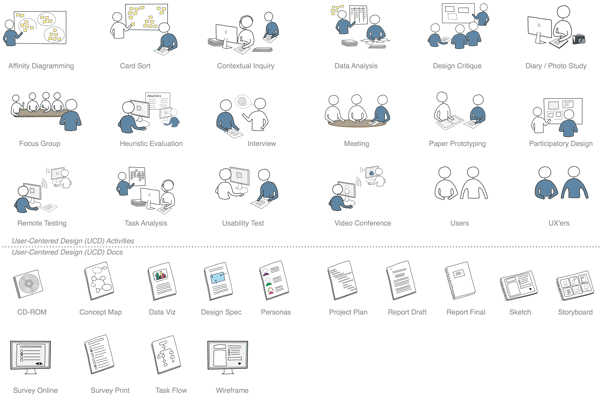
User Experience Stencil for Omnigraffle, Visio, Pencil & Keynote
Download the stencil, then drag the desired image from the stencil onto your document to help illustrate your research plan and the types of deliverables you will produce.
Make a donation
If this stencil saves you time, consider making a donation to the author, Todd Zazelenchuk. This ensures the stencil will be updated in the future. Most people donate around $3, but you can give anything you like.
Want to see how people use these stencils?
If you use the stencils and post your work on the internet, let us know so we can share it with others.
- Elizabeth Whitworth used the stencils in her great "User experience: How can it help?" poster (warning: pdf file).
How to credit these stencils
Please use this credit line: "UX Stencil © Todd Zazelenchuk & Elizabeth Boling. Available from http://www.userfocus.co.uk/uxstencil/".
About the author

Dr. Todd Zazelenchuk (@ToddZazelenchuk on Twitter) holds a BSc in Geography, a BEd, an MSc in Educational Technology and a PhD in Instructional Design. Todd is an associate of Userfocus and works in product design at Plantronics in Santa Cruz, CA where he designs integrated mobile, web, and client-based software applications that enhance the user experience with Plantronics' hardware devices.

Foundation Certificate in UX
Gain hands-on practice in all the key areas of UX while you prepare for the BCS Foundation Certificate in User Experience. More details


User Experience Articles & Videos
Our most recent videos
Our most recent articles
- Dec 2: Usability task scenarios: The beating heart of a usability test
- Nov 4: Common traps in user needs research and how to avoid them
- Oct 7: Transitioning from academic research to UX research
- Sep 2: The minimalist field researcher: What's in my bag?
- Aug 5: The future of UX research is automated, and that's a problem
Filter articles by keyword
- accessibility •
- axure •
- benefits •
- careers •
- case study •
- css •
- discount usability •
- ecommerce •
- ethnography •
- expert review •
- fitts law •
- focus groups •
- forms •
- guidelines •
- heuristic evaluation •
- ia •
- iso 9241 •
- iterative design •
- layout •
- legal •
- metrics •
- mobile •
- moderating •
- morae •
- navigation •
- personas •
- prototyping •
- questionnaires •
- quotations •
- roi •
- selling usability •
- standards •
- strategy •
- style guide •
- survey design •
- task scenarios •
- templates •
- tools •
- usability testing •
- user manual